Functions
Theme Support
The theme_setup() function configures essential WordPress theme features and capabilities. This function runs on the after_setup_theme hook to ensure proper timing during WordPress initialization.
function theme_setup() {
    // Enables WordPress to manage the document title tag automatically
    // WordPress will handle <title> generation based on page context
    add_theme_support( 'title-tag' );

    // Enables featured image/post thumbnail functionality
    // Allows posts and pages to have featured images
    add_theme_support( 'post-thumbnails' );

    // Enables HTML5 markup for core WordPress features
    // Provides cleaner, semantic HTML output for various elements
    add_theme_support(
        'html5',
        array(
            'search-form',     // Search widget form
            'gallery',         // Image gallery shortcode
            'caption',         // Image captions
            'script',          // JavaScript tags
            'style',           // CSS style tags
        )
    );

    // Makes embeds (YouTube, Twitter, etc.) responsive automatically
    // Wraps oEmbeds in responsive containers
    add_theme_support( 'responsive-embeds' );

    // Enables custom editor stylesheets for the block editor
    // Allows styling the Gutenberg editor to match front-end appearance
    add_theme_support( 'editor-styles' );

    // Wide and full-width block alignments (currently disabled)
    // Would allow blocks to extend beyond content width
    // add_theme_support( 'align-wide' );

    // Default block styles from WordPress (currently disabled)
    // Would include WordPress's default block styling
    // add_theme_support( 'wp-block-styles' );

    // Enables custom spacing controls in the block editor
    // Allows users to adjust margins and padding on blocks
    add_theme_support( 'custom-spacing' );

    // Enables appearance tools in the site editor
    // Provides additional design options like colors, typography, etc.
    add_theme_support( 'appearance-tools' );

    // Internationalization support (currently disabled)
    // Would enable multi-language support with translation files
    // load_theme_textdomain( 'pocpoc', get_template_directory() . '/assets/languages' );
}
add_action( 'after_setup_theme', 'theme_setup' );
Vite Asset Enqueuing
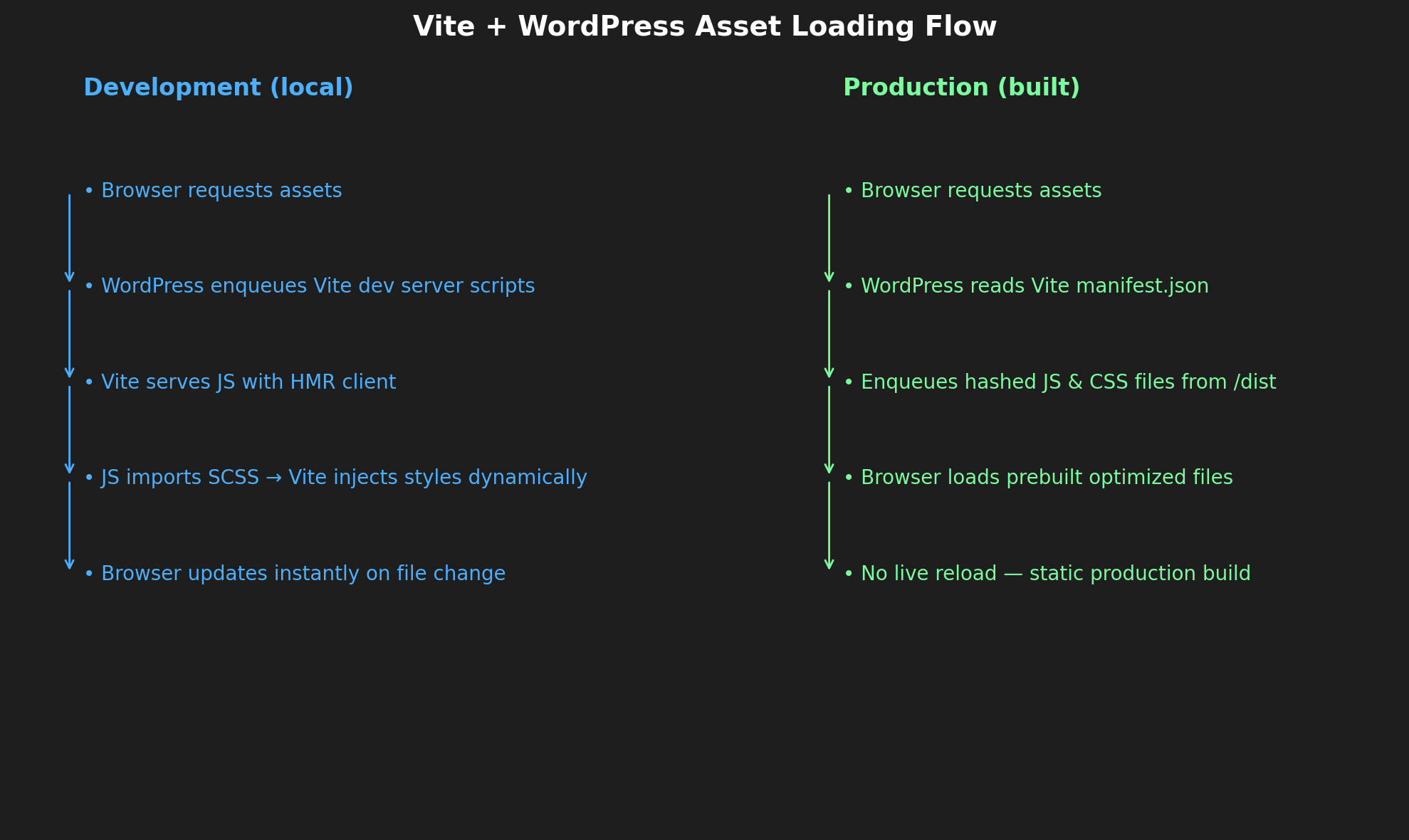
/*------------------------------------*\
    Vite Asset Enqueuing (WP + Vite)
\*------------------------------------*/

// Reads the Vite `manifest.json` generated during `vite build`
// This manifest maps your source files to their processed, hashed filenames.
function get_vite_manifest() {
    $manifest_path = get_template_directory() . '/assets/dist/.vite/manifest.json';
    if ( ! file_exists( $manifest_path ) ) {
        return array(); // No manifest found → return empty array
    }
    $manifest_content = file_get_contents( $manifest_path );
    if ( false === $manifest_content ) {
        return array(); // Failed to read file → return empty
    }
    $manifest = json_decode( $manifest_content, true );
    if ( JSON_ERROR_NONE !== json_last_error() ) {
        return array(); // JSON parse error → return empty
    }
    return $manifest ?: array();
}

function theme_scripts() {
    // Avoid enqueuing scripts in the WordPress admin or login page
    if ( is_admin() || ( isset( $GLOBALS['pagenow'] ) && $GLOBALS['pagenow'] === 'wp-login.php' ) ) {
        return;
    }

    // Detect current environment (your helper should return 'local' for dev)
    $environment = get_environment();

    if ( $environment === 'local' ) {
        /**
         * DEVELOPMENT MODE
         * - Use Vite's dev server for instant HMR (Hot Module Replacement)
         * - Load only JS — Vite will inject styles automatically via JS imports
         */
        $dev_version = time(); // Bust cache on each refresh
        wp_enqueue_script( 'vite-client', 'http://localhost:3000/@vite/client', array(), $dev_version, true );
        wp_enqueue_script( 'main-js', 'http://localhost:3000/src/js/main.js', array(), $dev_version, true );

        // Note: main.js should import your main.scss file
        // Example: `import '../scss/main.scss'`

    } else {
        /**
         * PRODUCTION MODE
         * - Use built & optimized files from /assets/dist/
         * - Use the manifest to get correct hashed filenames
         */
        $manifest  = get_vite_manifest();
        $dist_dir  = get_template_directory() . '/assets/dist/';
        $dist_uri  = get_template_directory_uri() . '/assets/dist/';

        // Get the main JS entry (includes references to emitted CSS)
        $entry = isset( $manifest['src/js/main.js'] ) ? $manifest['src/js/main.js'] : null;

        if ( $entry ) {
            // Enqueue JS
            if ( ! empty( $entry['file'] ) ) {
                $js_file = $entry['file'];
                wp_enqueue_script(
                    'main-js',
                    $dist_uri . $js_file,
                    array(),
                    file_exists( $dist_dir . $js_file ) ? filemtime( $dist_dir . $js_file ) : null,
                    true
                );
            }

            // Enqueue CSS linked in the manifest from main.js imports
            if ( ! empty( $entry['css'] ) && is_array( $entry['css'] ) ) {
                foreach ( $entry['css'] as $i => $css_file ) {
                    wp_enqueue_style(
                        'main-css-' . $i,
                        $dist_uri . $css_file,
                        array(),
                        file_exists( $dist_dir . $css_file ) ? filemtime( $dist_dir . $css_file ) : null
                    );
                }
            }
        } else {
            /**
             * FALLBACK:
             * If you ever build SCSS directly as its own entry (not imported via JS)
             */
            if ( ! empty( $manifest['src/scss/main.scss']['css'] ) ) {
                foreach ( $manifest['src/scss/main.scss']['css'] as $i => $css_file ) {
                    wp_enqueue_style(
                        'main-css-fallback-' . $i,
                        $dist_uri . $css_file,
                        array(),
                        file_exists( $dist_dir . $css_file ) ? filemtime( $dist_dir . $css_file ) : null
                    );
                }
            }
        }
    }

    // Pass PHP data to JavaScript (AJAX URL, nonce, theme URL, etc.)
    $theme_data = array(
        'ajaxUrl'  => admin_url( 'admin-ajax.php' ),
        'nonce'    => wp_create_nonce( 'ajax-nonce' ),
        'themeUrl' => get_template_directory_uri(),
    );
    wp_add_inline_script( 'main-js', 'window.themeData = ' . wp_json_encode( $theme_data ), 'before' );
}
add_action( 'wp_enqueue_scripts', 'theme_scripts' );

// Filter to make certain scripts load as ES Modules (required by Vite)
function make_main_script_module( $tag, $handle, $src ) {
    if ( in_array( $handle, array( 'main-js', 'vite-client' ), true ) ) {
        return '<script type="module" src="' . esc_url( $src ) . '"></script>';
    }
    return $tag;
}
add_filter( 'script_loader_tag', 'make_main_script_module', 10, 3 );
Move Yoast to bottom
// Move Yoast meta box to bottom
function move_yoast_to_bottom() {
    return 'low';
}
add_filter( 'wpseo_metabox_prio', 'move_yoast_to_bottom' );
Include additional function files
This function will include all php files inside assets/functions/, this is done to make the functions.php more maintainable and clear.
/*------------------------------------*\
    Include Additional Function Files
\*------------------------------------*/

foreach ( glob( get_template_directory() . '/assets/functions/*.php' ) as $file ) {
    require $file;
}
acf-local-json.php
This script connects WordPress Gutenberg blocks with ACF Local JSON so that each block can keep its own field group JSON in its own folder — instead of everything going into one big acf-json directory.
Main Functionality
Registers blocks automatically
- Looks in
assets/blocks/*/block.json - Calls
register_block_type_from_metadata()for each
Loads ACF JSON from multiple places
- Central
acf-jsonfolder - Each block's folder (so their fields load automatically)
Saves ACF JSON intelligently
- If a field group targets a specific block → save JSON into that block's folder
- If not block-specific → save to central
acf-json
Custom JSON filenames
- If tied to a block → filename = block slug
- Otherwise → filename = field group title
Optional debug logging
- Controlled by
ACF_JSON_DEBUGconstant - Logs loaded paths, save decisions, and registrations
Key Benefits
- Organized Structure: Each block contains its own field definitions
- Auto-sync: Changes to block fields automatically update the right JSON file
- Team Friendly: Easier collaboration with separate JSON files per block
- Debug Ready: Built-in logging for troubleshooting ACF field issues
add-editor-stylesheet.php
This script loads the editor.css from the dist folder when the block editor is opened in the backend.
allow-svg.php
Allows svg's
disable-comments.php
Disables all comment functionality and REST API's
⚡ enqueue-vite-entries.php
The enqueue-vite-entries.php file is a sophisticated WordPress utility that bridges Vite.js build system with WordPress's asset enqueueing system. Here's how it works in this project:
Main Purpose
It automatically handles JavaScript and CSS asset loading for WordPress blocks, making sure assets are only being enqueued whenever they're being used inside the page. It supports both development (with Vite's HMR) and production (with built assets) modes.
Key Functions
1. enqueue_vite_entry_auto()
Usage: enqueue_vite_entry_auto(__FILE__); in block PHP files
- Auto-discovers block assets based on file directory structure
- Convention: Expects
blocks/<slug>/<slug>.jsstructure - Example: If called from
blocks/hero-section/hero-section.php, it automatically enqueuesblocks/hero-section/hero-section.js
2. enqueue_vite_entry()
Core functionality that handles both development and production modes:
Development Mode (vite_is_dev() returns true):
- Serves assets directly from Vite dev server (
localhost:3000) - Enables Hot Module Replacement (HMR)
- Adds
type="module"for ES modules
Production Mode:
- Reads Vite's manifest file (
dist/.vite/manifest.json) - Enqueues built JS/CSS files with proper versioning
- Handles CSS dependencies and imports automatically
Integration with Project
1. Vite Configuration (vite.config.js:8-23)
function getBlockEntries() {
    const files = fg.sync('assets/blocks/*/*.js', { dot: false });
    // Creates entries for each block's JS file
}
Workflow Example
- Block PHP file calls
enqueue_vite_entry_auto(__FILE__); - Function extracts directory name (e.g., "image-and-content")
- Development: Loads
http://localhost:3000/assets/blocks/image-and-content/image-and-content.js - Production: Reads manifest, finds built assets in
/dist/, enqueues with proper versioning
Benefits
- Automatic Discovery: No manual asset registration needed
- Environment Awareness: Seamlessly switches between dev/prod
- Hot Module Replacement: Live reloading during development
- Optimal Production: Proper versioning, chunking, CSS handling
- Module Support: ES6 modules with
type="module" - Dependency Resolution: Handles CSS imports and chunks automatically
This system allows developers to focus on building blocks while the asset pipeline is handled automatically, supporting modern JavaScript development workflows within WordPress.
security-hardening.php
The security-hardening.php file implements defensive security measures to prevent user enumeration attacks and unauthorized data access. It blocks non-authenticated users from accessing WordPress REST API endpoints that could reveal user information (/wp/v2/users), redirects author archive pages to prevent username discovery through URLs, and optionally restricts media listings via the REST API for guests.